By Rowena Hazel Merton · Publisher: OpenAccessNight Returning Screen Notebook
Two screen layers
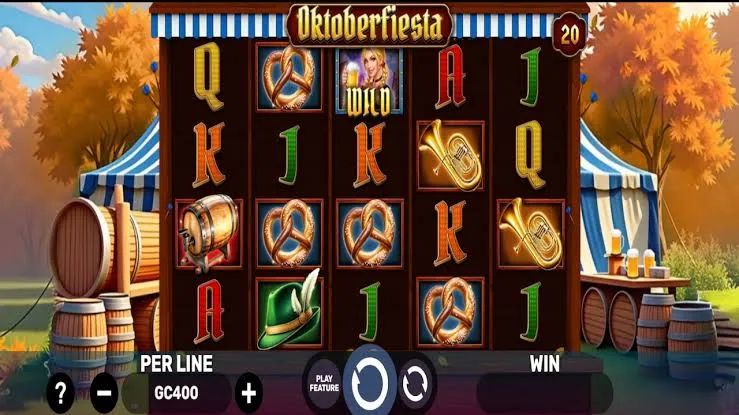
A phone can show the website around a game and the game itself at the same time. OpenAccessNight’s play pages place an external game inside a frame. The logo, navigation and page title belong to the surrounding site; the symbols and game controls belong to the loaded screen. Knowing which layer you are looking at makes an interruption easier to describe.
This October 2026 article treats a returning screen as something to inspect, rather than proof that every earlier setting survived. A browser may leave a tab open, reload it or show a waiting screen after you switch apps. The visible result depends on what actually loaded. A familiar page title alone cannot confirm the game state, current balance or whether a round has finished.
| Surrounding website | Loaded game |
|---|---|
| Home and All articles links | Round controls and help panel |
| Page heading and breadcrumbs | Game title and credit display |
| Website scrolling | Any controls offered inside the frame |
After a phone break
When an embedded social game returns, first take your hands off its main action button. Read any message and look for a finished result or a clear waiting state. If the animation is still moving, give the screen time before deciding what happened. Repeated taps can make your own account of the interruption less clear, even when you cannot yet tell how the game responded.
A simple return check
- Identify the page and the title visible inside the game.
- Read any loading, connection or confirmation message.
- Check the visible balance and selected round setting.
- Find the help control before choosing another action.
If a setting differs from what you remember, treat the displayed value as a question to resolve. Do not assume that opening the same URL restores the same session. The site’s virtual credits are described as having no monetary value, but understanding the display still matters. A large animation and a balance counter may report different parts of a round, so read them together where possible.
Phone orientation can also change what fits on the screen. Rotate only when it helps you see a label, and allow the layout to settle before tapping. Browser zoom may improve surrounding text without changing controls inside the frame in the same way. Use whichever view lets you read the actual labels, rather than treating a smaller or larger button as evidence of a changed game rule.
- Separate a website menu from a game menu when describing controls.
- Read the current setting instead of relying on your last visit.
- Keep an uncertain round separate from a confirmed result.
- Pause if controls remain unreadable or the screen keeps loading.
Describing a problem
A useful report says what you saw and what you did immediately before it. Record the page address, device and browser, then describe whether you changed apps, rotated the phone or reopened the tab. Note the exact message if one appears. These details are more helpful than saying the game lost everything when the visible screen has not yet established that conclusion.
A screenshot can show the difference between a blank frame and a loaded game with a hidden control. Crop unrelated notifications, email addresses and personal details before sharing it. If the image includes a credit counter, explain whether it was taken before or after the interruption. A still image cannot establish an entire sequence, so pair it with a short account of the steps you remember.
The companion article on game names and rule screens helps identify the title behind the page label. For the social side of an interrupted evening, late-night play and company explains why a break does not need to become a group obligation. You can close the tab and return another day.
Author’s opinion
I find an embedded social game easier to approach when I separate the website from the game inside it. That small distinction improves both the first tap after a break and any report about a problem. My preference is to read the returning state calmly, acknowledge missing information and stop if the controls are unclear. A leisure screen should give me room to understand what I am choosing.